Statistics and conversions
Read your dashboard and follow each conversion.
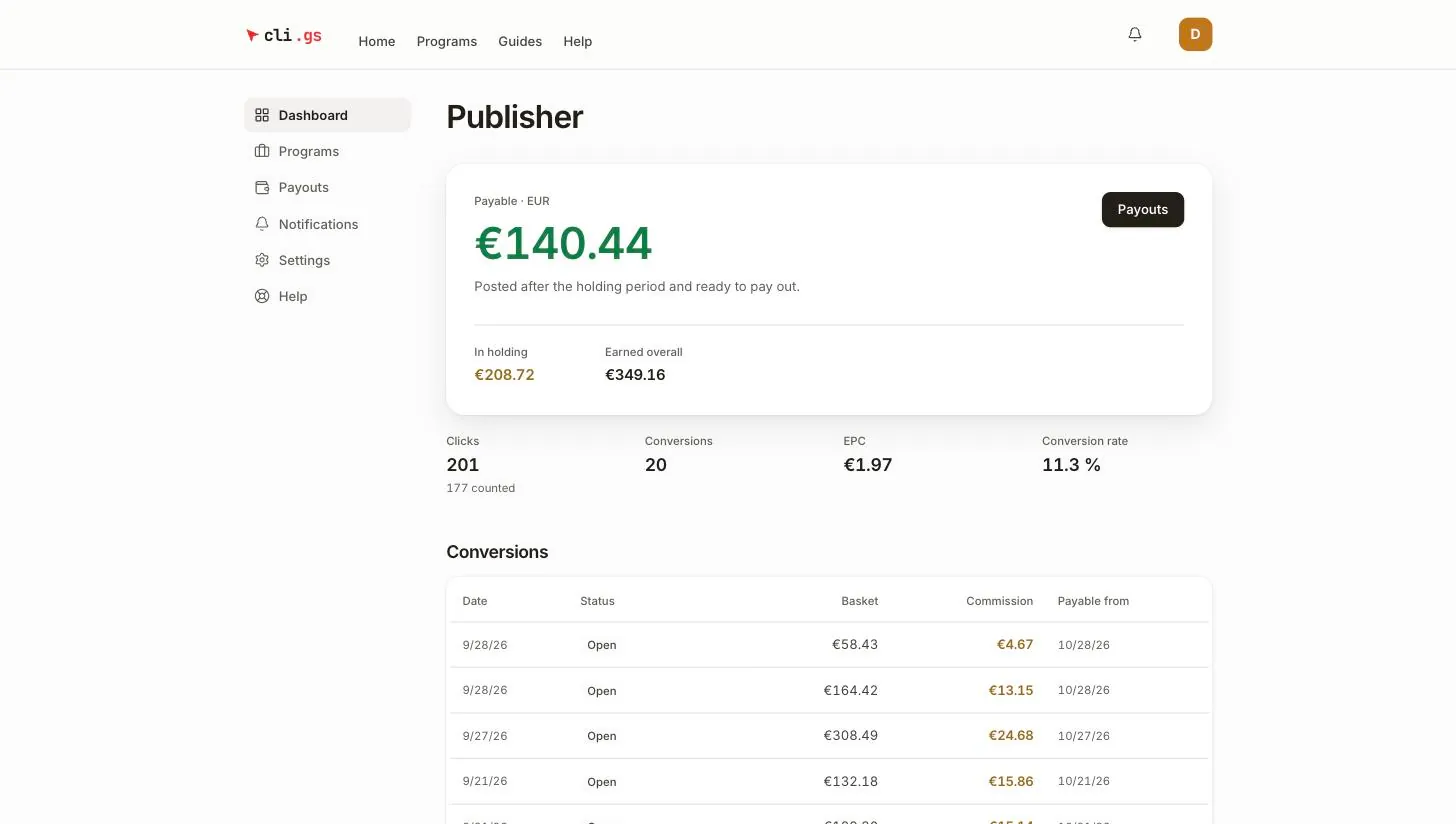
The publisher Dashboard shows what you can take out, what is still ripening, and how your traffic performs. Below that, every conversion is listed with its status. On this page you'll learn how to read the figures and follow each sale from the report to the payout.
In short:
- Payable is what the next monthly payout can include. In holding is booked but not payable yet.
- EPC and conversion rate use counted clicks only.
- Under Conversions you see your latest 20 conversions with their status.
- Once a conversion is In payout or Paid, it is final.
Your balance
At the top is a card per currency. Balances in different currencies are never added up.
| Figure | Meaning |
|---|---|
| Payable | Commission whose holding period is over. It is paid with the next monthly run if it reaches the threshold. |
| In holding | Commission that has been booked but is not payable yet: still in the approval window or in the holding period. |
| Earned overall | Everything you have earned in this currency since you started. |
Payouts takes you to the payout set-up and your credit notes. See Get paid.
Statistics
| Figure | Meaning |
|---|---|
| Clicks | All clicks on your links. Below it, "counted" shows how many passed the bot and abuse checks. |
| Conversions | Sales, leads and sign-ups reported for your links. |
| EPC | Earnings per click: commission divided by counted clicks, in your main currency. |
| Conversion rate | Conversions divided by counted clicks. |
EPC and conversion rate use counted clicks only. An uncounted click is one we decided not to trust. The statistics are refreshed hourly. The balances above are live.
For each programme, the programme page under Programs shows the clicks and conversions of that one link.
Your conversions
Under Conversions the dashboard lists your latest 20 conversions with Date, Status, Basket, Commission and Payable from.
| Status | Meaning | Counts towards |
|---|---|---|
| Open | Reported by the shop. The merchant can still reject it for 30 days. | In holding |
| Under review | Parked until it is confirmed (see below). | Nothing yet |
| Approved | Approved by the merchant or after the 30 days; the holding period is running. | In holding |
| Payable | The holding period is over. | Payable |
| In payout | Locked into a payout. The commission is now final. | The payout |
| Paid | Transferred to you. | Earned overall |
| Rejected | Refused by the merchant or a reviewer. | Nothing |
| Reversed | Taken back after it was booked, for example after a return. | Nothing |
Payable from is shown for open and approved conversions. The holding period counts from approval. For an open conversion the date is therefore an early estimate. It moves back once the conversion is approved.
Why a conversion is under review
A conversion is parked instead of booked when something needs to be confirmed first:
- it was reported only by the browser pixel and waits for the shop's server-to-server confirmation,
- the merchant's credit does not cover it; it is booked as soon as they top up,
- fraud checks flagged it, for example because the click and the order came from the same IP address, or the publisher's own account clicked,
- no commission rule of the programme matched.
A reviewer or the merchant then approves or rejects it. Parked conversions don't appear in your balance until they're approved.
Rejections and reversals
A commission can be taken back in two ways:
- Rejected: the merchant objects during the 30-day approval window, for example because the order was cancelled. They must give a reason.
- Reversed: the shop reports a return, cancellation, chargeback or similar after the conversion was booked. This is possible while the conversion is open, under review, approved or payable.
Once a conversion is In payout or Paid, it is final. A later return is the merchant's loss, not yours. Nothing is deducted from a later payout. When a booked commission is reversed, you get a notification with the programme and the amount.