Publisher applications
Accept, decline, revoke and reactivate publishers.
Publishers apply to your live programmes from the marketplace, and you decide who may promote you. On this page you'll learn what an application tells you and what approving, rejecting, revoking and reactivating do. You find the applications for all your programmes under Applications in the merchant navigation.
In short:
- Read the flags, the claimed reach and the channels before you approve.
- Approve creates the publisher's link at once.
- Reject needs a reason of at least 10 characters. The publisher sees it.
- Revoke approval deactivates a publisher's links. Reactivate brings them back.
- On the free tier you can have one approved publisher. From €100 credit, there's no limit.
The applications page
The page has one tab per state, each with a count:
| Tab | Meaning |
|---|---|
| Pending | Waiting for your decision. |
| Approved | The publisher is in the programme and has a working link. |
| Rejected | You turned the application down. |
| Revoked | You approved the publisher and later took the approval back. |
| Withdrawn | The publisher took back an application you had not decided yet. |
You receive a notification when a new application arrives. If your notification settings say so, you also get an e-mail. See Account and security.
Reading an application
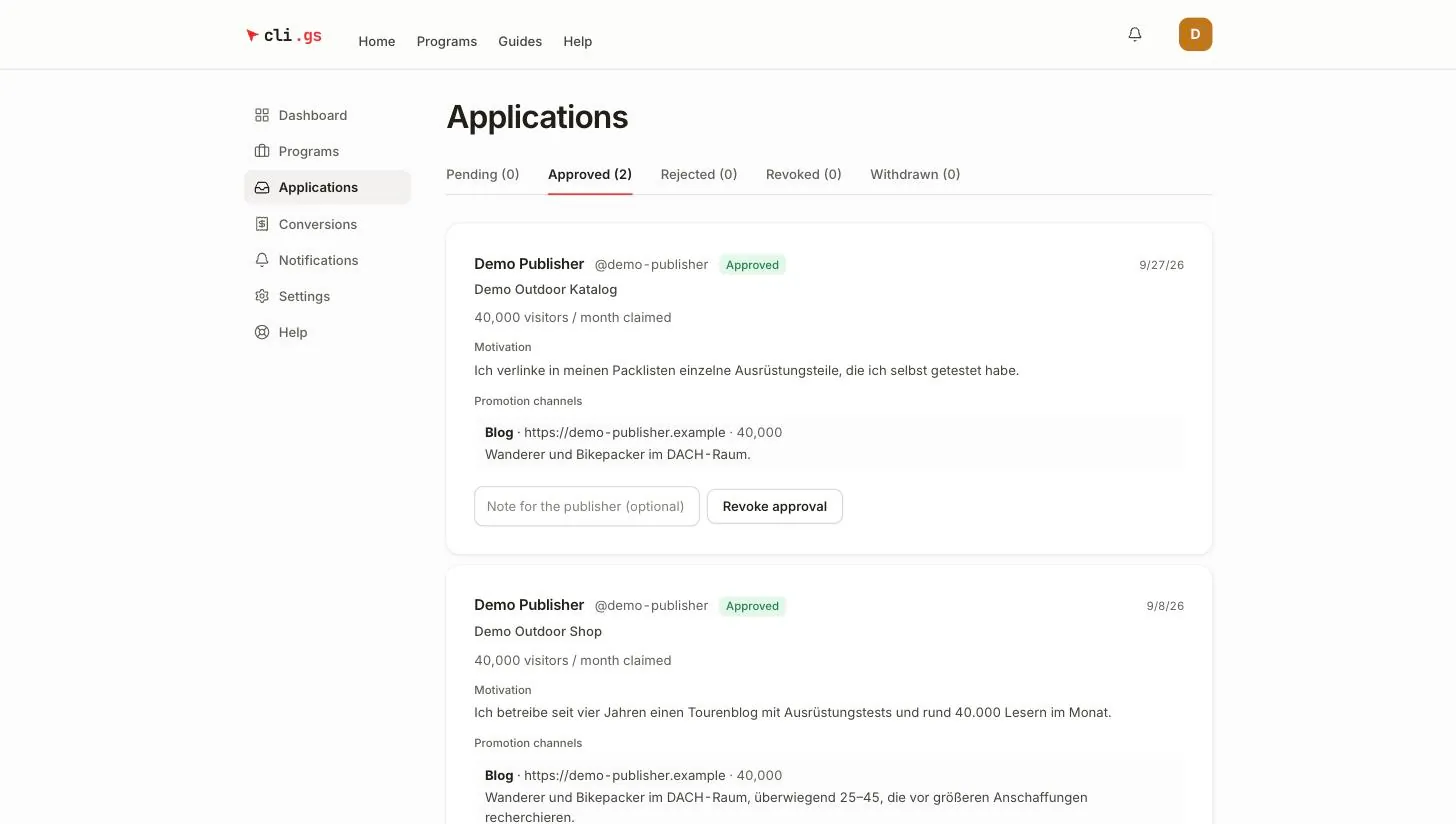
Each application shows the publisher's name and handle, the programme they applied to, and the date. Below that:
- Flags — shown first because most programmes care about them: paid traffic, brand bidding, coupons, cashback. Compare them with your terms before you approve.
- Claimed reach — the monthly visitors the publisher states.
- Motivation — why they want to promote you and how.
- Promotion channels — each channel with its type (Website, Blog, Newsletter, YouTube, Paid search …), URL or handle, monthly visitors and a description of the audience.
Reach and channels are the publisher's own statements. Checking a channel URL before you approve is worth the minute it takes.
Approving
Click Approve. cli.gs creates the publisher's tracking link in the same step. The publisher is notified and can start promoting right away. Whether the approval goes through depends on your publisher quota (see below).
Rejecting
- Click Reject.
- Enter a Reason (required, at least 10 characters).
- Confirm with Reject.
The publisher sees your reason. A publisher who is told no without a why tends to apply again with the same pitch. Be specific, for example "We don't work with coupon sites" or "Please add a German-language channel."
A rejected publisher can apply to the same programme again 30 days after your decision.
Revoking an approval
- Open the Approved tab.
- If you like, enter a Note for the publisher (optional).
- Click Revoke approval.
The publisher is notified, with your note if you wrote one.
- Their links are deactivated, not deleted. Visitors who click them no longer reach your shop.
- Commissions already booked for this publisher are not affected.
- Conversions reported after the revocation are recorded but earn nothing. They show "The publisher is no longer active in this program".
- The publisher no longer counts towards your quota.
Revoke when a publisher breaks your terms or you no longer want to work with them. To reject individual sales instead, see Review conversions.
Reactivating
A revoked publisher can be taken back. In the Revoked tab, click Reactivate. The quota applies as for any approval. The publisher gets their previous link back, with the same URL, so anything they shared works again. They're notified.
A withdrawn application can't be reactivated by you. The publisher can simply apply again at any time.
The publisher quota
On the free tier you can have one approved publisher across all your programmes. When it's used, approving or reactivating fails with "Your publisher quota is used up."
A credit balance of €100 or more removes the limit. The quota is checked at the moment you approve, not when the publisher applies. An application can therefore wait in Pending until you've topped up. See Credit and costs.