Report conversions
The server-to-server postback, its fields and answers.
The server postback is how your shop tells cli.gs about a sale. On this page you'll learn which request to send, which fields it takes, and how to read the answer. Your server sends one HTTPS request per order, with the ref code it saved and the order details. This is the only channel that books a commission on its own, so every integration needs it.
In short:
- Send
POST https://cli.gs/api/v1/track/conversionfrom your server with your API key. - Always send
ref,orderIdand the netamount. AddcurrencyandcustomerTypewhere you can. - Reports are idempotent: the same
orderIdcounts once, so retries are safe. 201means recorded,200means already on file. Retry on429and5xx, fix the request on400,401and422.
The request
POST https://cli.gs/api/v1/track/conversion
Authorization: Bearer YOUR_API_KEY
Content-Type: application/json
Send it from your server, never from the browser. The best moment is when the order is confirmed or paid. If the request fails with a network error, a timeout, HTTP 5xx or 429, retry it later. Repeating a report is harmless.
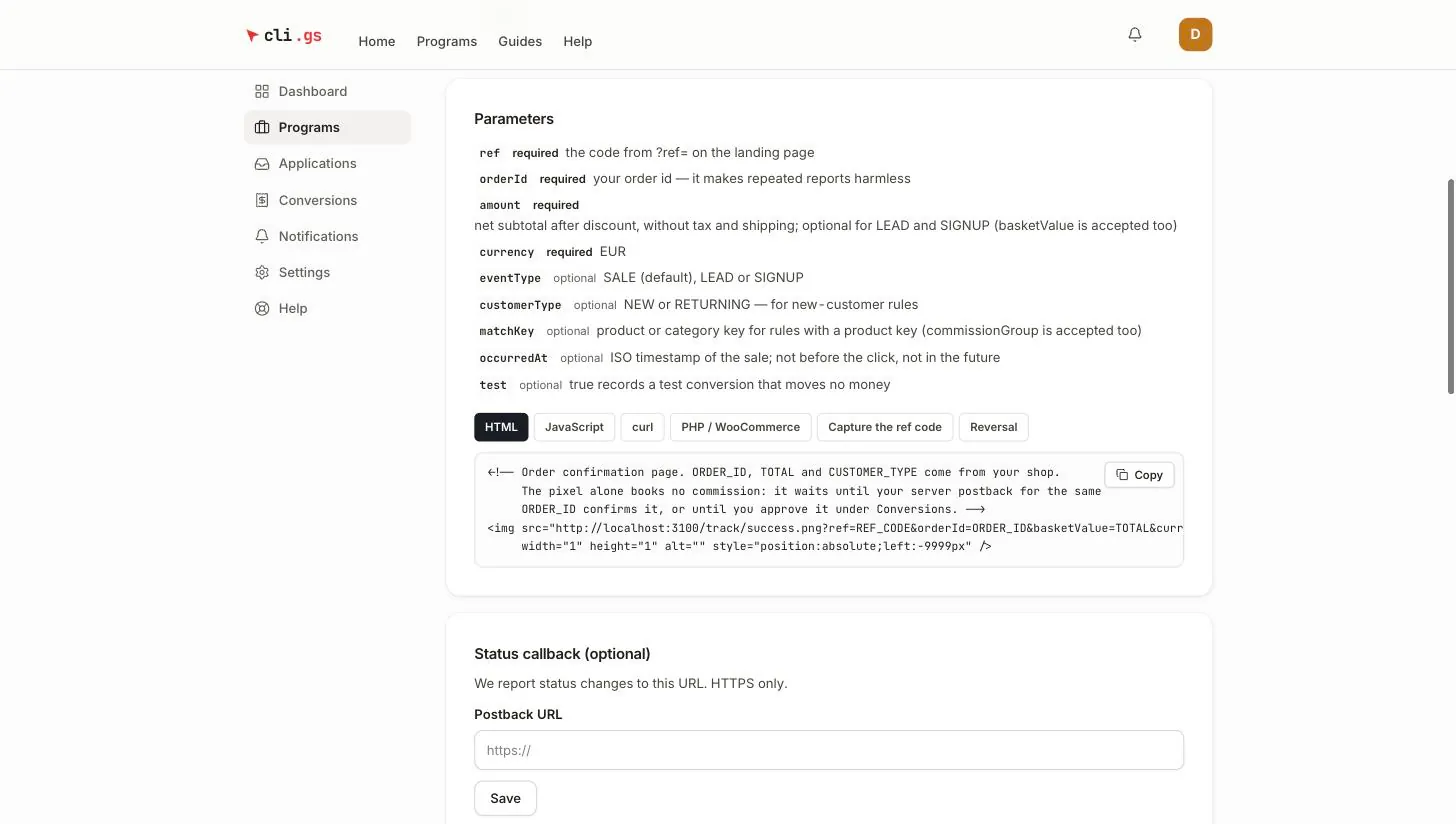
Fields
| Field | Required | Meaning |
|---|---|---|
ref | yes | The code from ?ref= on the landing page |
orderId | yes | Your order id, up to 190 characters. It makes repeated reports harmless |
amount | for SALE | Net subtotal after discount, without tax and shipping. basketValue is accepted too |
currency | recommended | Three-letter code. Programmes settle in EUR; if omitted, the programme's currency is used |
eventType | no | SALE (default), LEAD or SIGNUP |
customerType | no | NEW or RETURNING, for new-customer commission rules |
matchKey | no | Product or category key for rules with a product key. commissionGroup is accepted too |
occurredAt | no | ISO 8601 time of the sale with time zone, e.g. 2026-09-28T14:05:00Z |
test | no | true records a test conversion that moves no money |
Details worth knowing
- amount can be a string or a number. Use a dot as decimal separator (
"149.99"). We also read149,99and1.234,56. We refuse anything ambiguous such as1.234, negative values and implausibly large baskets. ForLEADandSIGNUPthe amount is optional. - currency other than EUR is recorded but parked for review, because programmes settle in EUR only.
- customerType with any other value is ignored. It's not treated as
RETURNING, so a typo can't lower a publisher's new-customer commission. - occurredAt matters when you report late, for example after payment clears. The cookie window is checked against this time, not against the time the request arrives. It must not lie before the click or in the future. Five minutes of clock difference are tolerated.
- test must be the JSON boolean
true, not1or"true".
Idempotency
Each order counts once. If we receive the same orderId again for the same eventType, nothing new is created. The answer is 200 with "duplicate": true and the conversion already on file. So you can safely retry after a timeout, or send the report from two places.
A lead and a sale may share an order id, for example a sign-up now and a purchase later. They're counted separately per eventType.
Examples
cURL
curl -X POST https://cli.gs/api/v1/track/conversion \
  -H "Authorization: Bearer YOUR_API_KEY" \
  -H "Content-Type: application/json" \
  -d '{
    "ref": "01J9Z4K6V0QX8M2N3P5R7S9T1WABCD",
    "orderId": "100234",
    "amount": "149.99",
    "currency": "EUR",
    "customerType": "NEW"
  }'
Node.js (fetch)
// Node 18+. Call this from your order-paid handler.
async function reportConversion(order) {
  const res = await fetch("https://cli.gs/api/v1/track/conversion", {
    method: "POST",
    headers: {
      Authorization: `Bearer ${process.env.CLIGS_API_KEY}`,
      "Content-Type": "application/json",
    },
    body: JSON.stringify({
      ref: order.cligsRef,              // saved with the order at checkout
      orderId: String(order.id),
      amount: order.netSubtotal.toFixed(2),
      currency: "EUR",
      customerType: order.isFirstOrder ? "NEW" : "RETURNING",
      occurredAt: order.createdAt.toISOString(),
    }),
    signal: AbortSignal.timeout(5000),
  });

  if (res.ok) return res.json();                           // 200 or 201
  if (res.status >= 500 || res.status === 429) throw new Error("retry later");
  const err = await res.json().catch(() => ({}));
  console.error("cli.gs refused the conversion", res.status, err.error); // do not retry unchanged
}
PHP (curl)
<?php
function cligs_report_conversion(array $data): array {
    $ch = curl_init('https://cli.gs/api/v1/track/conversion');
    curl_setopt_array($ch, [
        CURLOPT_POST           => true,
        CURLOPT_RETURNTRANSFER => true,
        CURLOPT_TIMEOUT        => 5,
        CURLOPT_HTTPHEADER     => [
            'Authorization: Bearer ' . getenv('CLIGS_API_KEY'),
            'Content-Type: application/json',
        ],
        CURLOPT_POSTFIELDS     => json_encode($data),
    ]);
    $body   = curl_exec($ch);
    $status = curl_getinfo($ch, CURLINFO_RESPONSE_CODE);
    curl_close($ch);
    return ['status' => $status, 'body' => json_decode((string) $body, true)];
}

$result = cligs_report_conversion([
    'ref'      => $order['cligs_ref'],
    'orderId'  => (string) $order['id'],
    'amount'   => number_format($order['net_subtotal'], 2, '.', ''),
    'currency' => 'EUR',
]);
WooCommerce
This example saves the ref code on the order at checkout. It reports the sale when the order moves to Processing, which means paid. It assumes the cligs_ref cookie from Capture the ref code.
<?php
// 1. At checkout: copy the ref code from the cookie onto the order.
function cligs_save_ref_on_order($order) {
    $ref = $_COOKIE['cligs_ref'] ?? '';
    if ($ref !== '' && preg_match('/^[0-9A-Za-z]{10,64}$/', $ref)) {
        $order->update_meta_data('_cligs_ref', $ref);
    }
}
add_action('woocommerce_checkout_create_order', 'cligs_save_ref_on_order'); // classic checkout
add_action('woocommerce_store_api_checkout_update_order_from_request', function ($order) { // block checkout
    cligs_save_ref_on_order($order);
    $order->save();
});

// 2. When the order is paid: report it. Runs server-side, also for background payment callbacks.
add_action('woocommerce_order_status_processing', function ($order_id) {
    $order = wc_get_order($order_id);
    $ref   = $order ? $order->get_meta('_cligs_ref') : '';
    if (!$ref || $order->get_meta('_cligs_reported')) {
        return;
    }

    // Net subtotal after discount, excluding tax and shipping.
    $amount = (float) $order->get_subtotal() - (float) $order->get_discount_total();

    $response = wp_remote_post('https://cli.gs/api/v1/track/conversion', [
        'headers' => [
            'Authorization' => 'Bearer ' . CLIGS_API_KEY, // define in wp-config.php
            'Content-Type'  => 'application/json',
        ],
        'body'    => wp_json_encode([
            'ref'        => $ref,
            'orderId'    => (string) $order->get_id(),
            'amount'     => number_format(max(0, $amount), 2, '.', ''),
            'currency'   => $order->get_currency(),
            'occurredAt' => $order->get_date_created()->format(DATE_ATOM),
        ]),
        'timeout' => 5,
    ]);

    $code = wp_remote_retrieve_response_code($response);
    if ($code === 200 || $code === 201) {
        $order->update_meta_data('_cligs_reported', 1);
        $order->save();
    }
});
The _cligs_reported flag only saves a request; the report itself is idempotent. If a request fails, you can simply report the order again later. A scheduled job that looks for paid orders with _cligs_ref but without _cligs_reported does that well.
Responses
A successful report returns the conversion as we recorded it:
{
  "ok": true,
  "conversionId": "cmg3x1q2w0001abcd9876efgh",
  "status": "PENDING",
  "commission": 12,
  "duplicate": false,
  "confirmed": false,
  "test": false
}
What the fields mean
statusisPENDINGwhen the commission is booked and waiting for the approval window. It'sNEEDS_REVIEWwhen the conversion is parked for you to decide, for example because of a non-EUR currency, no matching commission rule, not enough credit, or fraud signals. It'sREJECTEDfor a test or for a publisher who is no longer active.commissionis the publisher's commission in the programme currency.duplicate: truemeans this order was already on file. Nothing changed.confirmed: truemeans this report confirmed a conversion the tracking pixel had already reported for the same order.
HTTP status codes
| HTTP | Body | What to do |
|---|---|---|
| 201 | ok: true | Recorded. Done |
| 200 | ok: true, duplicate or confirmed | Already on file, or pixel conversion confirmed. Done |
| 400 | error: "invalid payload" with issues, or "invalid json body" | Fix the request (missing orderId, wrong eventType, test not a boolean, ...) |
| 401 | e.g. "invalid api key", "invalid signature" | Check the key and the signature |
| 403 | error: "REF_PROGRAM_MISMATCH" | The ref code belongs to another programme; use that programme's key |
| 422 | error: "<CODE>" | The report was understood but not accepted. Retrying unchanged won't help |
| 429 | "rate limit exceeded" | More than 600 requests per minute for this key. Retry later |
| 5xx | Temporary problem on our side. Retry later |
The 422 codes (REF_UNKNOWN, REF_EXPIRED, INVALID_BASKET and others) are explained with their fixes in Testing and diagnostics.
Next steps
Protect the request with a signature, then handle returns and reversals.