Signed requests
Protect your requests with an HMAC signature.
An API key alone is a password that travels with every request. If it leaks, for example through a log file or a misconfigured plugin, whoever has it can report conversions for your programme. On this page you'll learn how to sign each request with a separate Signing secret that never leaves your server, and how to make cli.gs refuse anything unsigned.
In short:
- The signing secret comes with your first API key and is shown only once.
- Each request carries three headers: a timestamp, a one-time nonce and an HMAC-SHA256 signature.
- Sign exactly the bytes you send. Most signature errors come from re-encoding the body.
- Test with signed requests first, then tick Refuse unsigned requests.
Where the secret comes from
The signing secret is shown together with your first API key. You find it under API key on the integration page, labelled Signing secret. Like the key, it's shown only once. Store it next to the key in your shop's secret configuration.
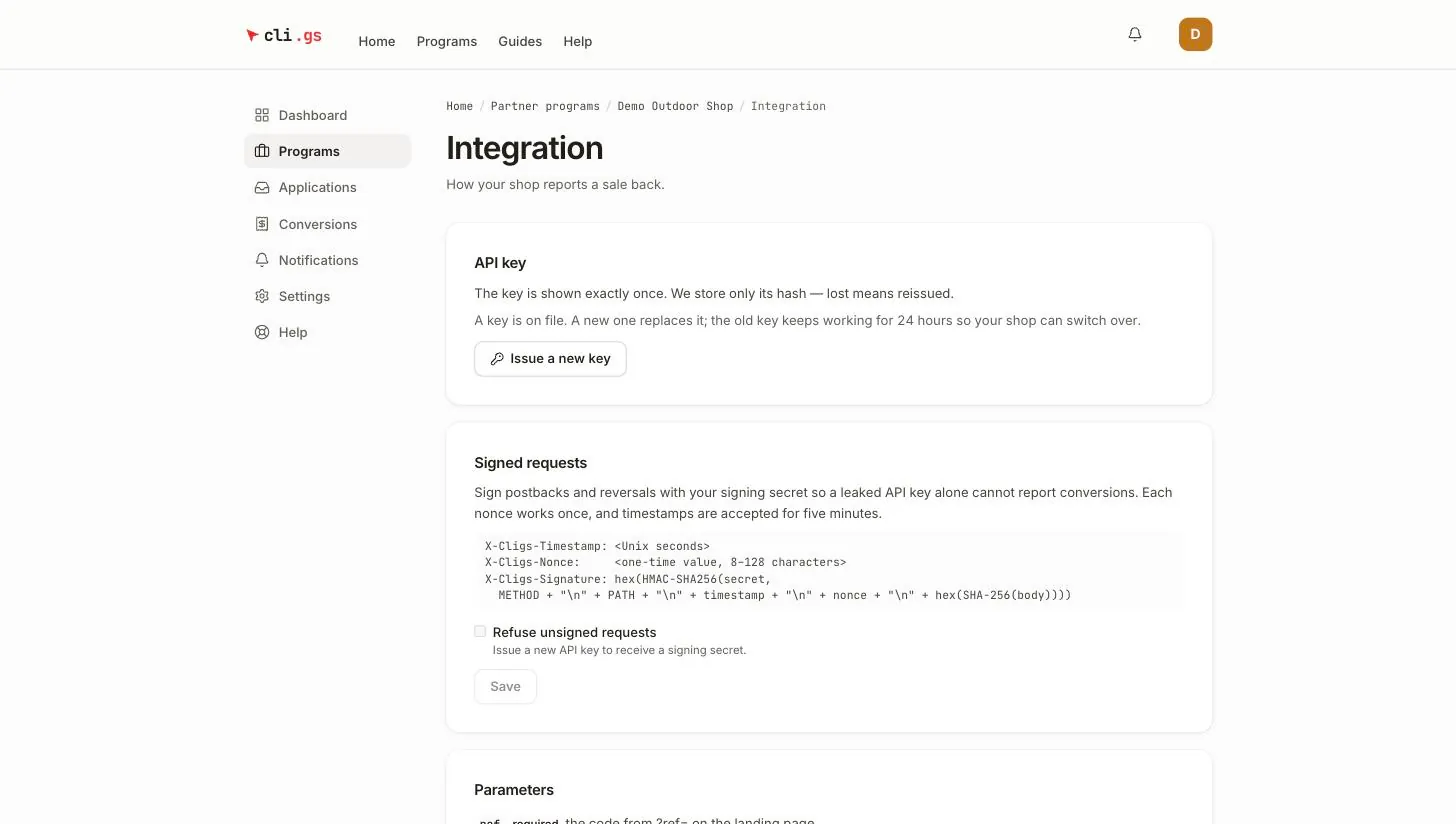
Issuing a new key later keeps the same signing secret. Requests stay valid while you switch keys.
The three headers
A signed request carries three extra headers:
| Header | Value |
|---|---|
X-Cligs-Timestamp | Current time in Unix seconds, e.g. 1790000000 |
X-Cligs-Nonce | A random one-time value, 8 to 128 characters (letters, digits and . _ ~ : + / = -) |
X-Cligs-Signature | The HMAC-SHA256 signature as lowercase hex |
A nonce is a value you use only once. It stops a captured request from being replayed.
What gets signed
The signature is calculated over five lines joined with a newline (\n):
POST
/api/v1/track/conversion
1790000000
3f9c2b7e41d04a8b9e6f0c1d2a3b4c5d
<hex SHA-256 of the exact request body>
The five lines are: the HTTP method in capitals, the path without host and query string, the timestamp, the nonce, and the SHA-256 hash of the body as hex. The HMAC key is the signing secret exactly as shown, used as a plain string.
When we accept a request
- The timestamp is within five minutes of our clock. Keep your server clock synchronised with NTP.
- The nonce hasn't been used before by your programme.
- The signature matches the body we received, byte for byte.
Node.js helper
import crypto from "node:crypto";

const BASE_URL = "https://cli.gs";
const API_KEY = process.env.CLIGS_API_KEY;
const SIGNING_SECRET = process.env.CLIGS_SIGNING_SECRET;

// Returns the three X-Cligs-* headers for one request.
export function cligsSignatureHeaders(method, path, body, secret = SIGNING_SECRET) {
  const timestamp = String(Math.floor(Date.now() / 1000));
  const nonce = crypto.randomBytes(16).toString("hex");
  const bodyHash = crypto.createHash("sha256").update(body, "utf8").digest("hex");
  const canonical = [method.toUpperCase(), path, timestamp, nonce, bodyHash].join("\n");
  const signature = crypto.createHmac("sha256", secret).update(canonical, "utf8").digest("hex");
  return {
    "X-Cligs-Timestamp": timestamp,
    "X-Cligs-Nonce": nonce,
    "X-Cligs-Signature": signature,
  };
}

// Sends a signed POST to the cli.gs API.
export async function cligsPost(path, payload) {
  const body = JSON.stringify(payload); // sign exactly the bytes you send
  const res = await fetch(BASE_URL + path, {
    method: "POST",
    headers: {
      Authorization: `Bearer ${API_KEY}`,
      "Content-Type": "application/json",
      ...cligsSignatureHeaders("POST", path, body),
    },
    body,
    signal: AbortSignal.timeout(5000),
  });
  return { status: res.status, data: await res.json().catch(() => null) };
}

// Usage:
// await cligsPost("/api/v1/track/conversion", { ref, orderId: "100234", amount: "149.99", currency: "EUR" });
// await cligsPost("/api/v1/track/reversal", { orderId: "100234", reason: "RETURN" });
PHP helper
<?php
// Returns the three X-Cligs-* headers for one request, ready for CURLOPT_HTTPHEADER.
function cligs_signature_headers(string $method, string $path, string $body, string $secret): array {
    $timestamp = (string) time();
    $nonce     = bin2hex(random_bytes(16));
    $canonical = implode("\n", [strtoupper($method), $path, $timestamp, $nonce, hash('sha256', $body)]);
    $signature = hash_hmac('sha256', $canonical, $secret);

    return [
        'X-Cligs-Timestamp: ' . $timestamp,
        'X-Cligs-Nonce: ' . $nonce,
        'X-Cligs-Signature: ' . $signature,
    ];
}

// Sends a signed POST to the cli.gs API.
function cligs_post(string $path, array $payload): array {
    $body = json_encode($payload); // sign exactly the bytes you send
    $ch = curl_init('https://cli.gs' . $path);
    curl_setopt_array($ch, [
        CURLOPT_POST           => true,
        CURLOPT_RETURNTRANSFER => true,
        CURLOPT_TIMEOUT        => 5,
        CURLOPT_POSTFIELDS     => $body,
        CURLOPT_HTTPHEADER     => array_merge([
            'Authorization: Bearer ' . getenv('CLIGS_API_KEY'),
            'Content-Type: application/json',
        ], cligs_signature_headers('POST', $path, $body, getenv('CLIGS_SIGNING_SECRET'))),
    ]);
    $response = curl_exec($ch);
    $status   = curl_getinfo($ch, CURLINFO_RESPONSE_CODE);
    curl_close($ch);
    return ['status' => $status, 'body' => json_decode((string) $response, true)];
}
In WordPress, pass the same headers to wp_remote_post() as an associative array. Call wp_json_encode() once and use the result for both the body and the signature.
Switch on "Refuse unsigned requests"
Until you switch it on, signing is optional. A request with a signature is checked. A request without one is accepted on the API key alone. Once your shop signs every request:
- Send a few signed test conversions and check that they're accepted.
- Tick Refuse unsigned requests under Signed requests.
- Click Save.
From then on, every conversion and reversal request without a valid signature is refused.
When a signature is refused
A signature problem is answered with HTTP 401 and a short reason in error:
error | Cause |
|---|---|
signature required | Refuse unsigned requests is on and the request had no signature |
stale or missing timestamp | Timestamp missing, not in seconds, or more than five minutes off |
invalid nonce | Nonce missing, too short, too long or with other characters |
nonce already used | The same nonce was sent twice. Generate a new one for every request, including retries |
invalid signature | The signature does not match |
no signing secret issued for this programme | You sent a signature, but the programme has no secret |
Most invalid signature errors come from signing something other than what is sent. Typical causes: re-encoding the JSON after signing, signing the full URL instead of the path, or a framework that adds whitespace to the body. Build the body string once and use it for both.
Next steps
With requests signed, set up returns and reversals.