Testing and diagnostics
Test mode, the diagnostics section and every error code.
Before real customers arrive, run your integration once from click to report. On this page you'll learn how test mode works, how to run an end-to-end test, where the diagnostics on the integration page are, and what every error code means. Test mode lets you do all this without moving money.
In short:
- Add
"test": trueto a conversion report. It goes through every check but never moves money. - A test needs a real ref code, so the programme must be live and you need a publisher link.
- Recent refusals on the integration page lists refused reports with their code and what to do.
- A refused report answers with a code in
error: 403 forREF_PROGRAM_MISMATCH, 422 for the others.
Test mode
Add "test": true to a conversion report. The report goes through every check a real one does: API key, signature, ref code, cookie window, amount and commission rules. Then:
- it's recorded as a test conversion that never moves money. No credit is reserved and the publisher earns nothing;
- the answer shows the commission a real report would have earned, with
"test": trueand statusREJECTED; - it appears under Test conversions on the integration page, not in your conversion list or statistics;
- if you've set a status callback, your endpoint receives
conversion.recordedwith"test": true.
Test conversions have their own order-id space. A test never blocks the real conversion with the same order id. Repeating a test with the same orderId returns the first result with "duplicate": true. Use a new order id for each run.
Run an end-to-end test
A test needs a real ref code, which only exists after a real click. So the programme has to be live, which means approved. You also need a publisher link for it, for example from a publisher you've accepted.
- Open the publisher link in a browser. You land on your shop with
?ref=...in the address bar. - Check that your shop has stored the code. See Capture the ref code.
- Place an order, or trigger your reporting code with
test: true. - Check the answer and the Test conversions list on the integration page.
Try the API by hand
Copy the ref code from the address bar and send it with cURL:
curl -i -X POST https://cli.gs/api/v1/track/conversion \
  -H "Authorization: Bearer YOUR_API_KEY" \
  -H "Content-Type: application/json" \
  -d '{
    "ref": "PASTE_REF_CODE_HERE",
    "orderId": "TEST-0001",
    "amount": "149.99",
    "currency": "EUR",
    "customerType": "NEW",
    "test": true
  }'
A working setup answers 201 Created:
{ "ok": true, "conversionId": "cmg3x1q2w0001abcd9876efgh", "status": "REJECTED", "commission": 12, "duplicate": false, "confirmed": false, "test": true }If you sign requests, test with the signed version from Signed requests before you switch on Refuse unsigned requests.
The diagnostics section
At the bottom of the integration page you find four blocks:
- Integration status shows two checks. Link check opens your target URL once a day the way a visitor would. It checks that the ref parameter survives your redirects. Shop reports compares every hour the conversions your shop reports with the errors we log and the clicks we send.
- Recent refusals lists reports from your shop we couldn't accept, newest first. Each entry shows the code, the time, the ref code and what to do.
- Test conversions lists your recent test reports with amount and commission.
- Postbacks sent to your shop lists deliveries to your status callback with their status, attempts and last HTTP code.
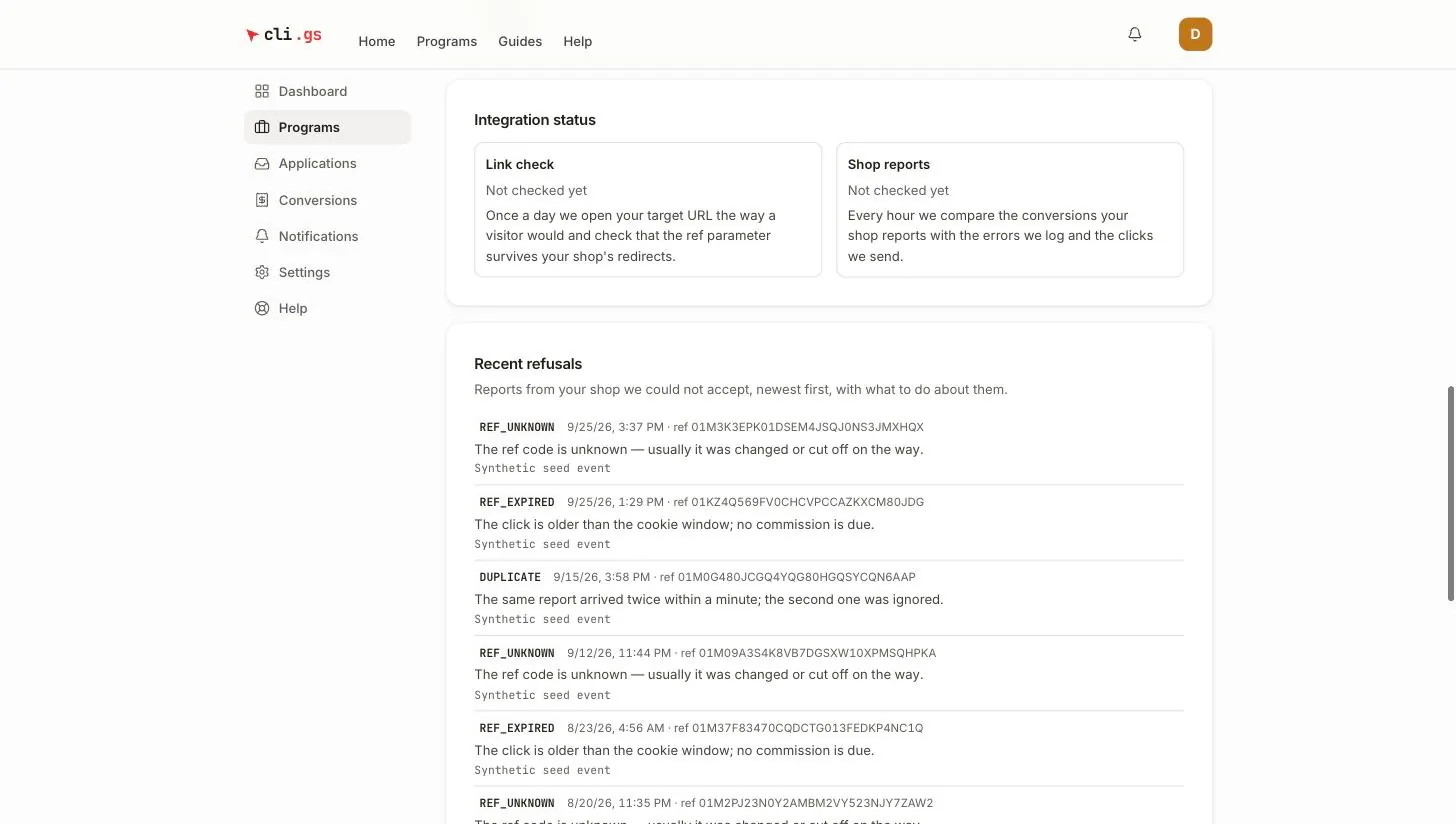
Refusals that can't be traced to your programme aren't listed there, for example a ref code that doesn't exist at all. The API answer always contains the code, so log the answers your shop receives.
Error codes
A refused conversion report is answered with the code in error: HTTP 403 for REF_PROGRAM_MISMATCH, HTTP 422 for the others. The same codes appear under Recent refusals.
| Code | Meaning | What to do |
|---|---|---|
BAD_SIGNATURE | The ref code failed its built-in check: it was changed, cut off or made up. This is about the code, not your HMAC signature | Store and send the code exactly as it arrived in ?ref= |
REF_UNKNOWN | The ref code has the right form but no click with this code exists | Check you send the stored code, not a placeholder or an old test value |
REF_PROGRAM_MISMATCH | The code belongs to a click on another programme | Use the API key of the programme the link belongs to. Each programme needs its own key |
INVALID_OCCURRED_AT | occurredAt lies in the future or before the click | Send the real order time with time zone; keep your server clock synchronised |
REF_EXPIRED | The click is older than the programme's cookie window; no commission is due | Nothing to fix if the sale really came late. If you report late, send occurredAt |
PROGRAM_INACTIVE | The programme was not live when the report arrived | Reports are accepted while the programme is approved or paused |
INVALID_BASKET | The amount could not be read, is negative or implausibly large | Send it with a dot as decimal separator, e.g. 49.90 |
DUPLICATE | The same report without an order id arrived twice within a minute; the second was ignored | Always send orderId. With an order id, repeats are answered 200 with duplicate: true instead |
INVALID_EVENT | Unknown eventType on the tracking pixel | Use SALE, LEAD or SIGNUP. On the API this is a 400 invalid payload |
INTERNAL | An error on our side | Nothing for you to do; we have been alerted. Retry the report later |
Other answers
These answers don't appear under Recent refusals:
| HTTP | error | What to do |
|---|---|---|
| 400 | invalid payload (with issues) or invalid json body | Fix the request; issues names the field |
| 401 | missing bearer token, invalid api key | Send Authorization: Bearer <key> with a current key |
| 401 | programme not active | The key belongs to a draft, rejected or archived programme |
| 401 | signature required, invalid signature, stale or missing timestamp, invalid nonce, nonce already used | See Signed requests |
| 404 | CONVERSION_UNKNOWN | Reversal for an order we have no conversion for |
| 409 | CONVERSION_FINAL | Reversal for a commission already locked for a payout |
| 429 | rate limit exceeded | More than 600 requests per minute per key; slow down and retry |
Checklist before going live
- The ref code is captured on every landing page, survives redirects and is saved with the order.
- Your server reports every paid order with
orderId, the net amount andcurrency. It retries on 5xx or timeouts. - A test conversion shows the commission you expect under Test conversions.
- Returns and cancellations trigger a reversal.
- Requests are signed and Refuse unsigned requests is on.
- Your shop removes
"test": truefor real orders.
Next steps
Once real conversions arrive, review them under Conversions: see Review conversions.