Review conversions
The approval window, rejecting and parked conversions.
Every sale, lead or sign-up your shop reports becomes a conversion. Most of them need nothing from you: they're booked, wait out the approval window and approve themselves. On this page you'll learn how to object to conversions that shouldn't be paid and how to decide on the ones cli.gs has parked for you. You find them under Conversions in the merchant navigation.
In short:
- An open conversion approves itself 30 days after the sale unless you reject it.
- Rejecting returns commission and fee to your credit at once.
- Parked conversions in To review wait for your decision. Each says why it's parked.
- The browser pixel never moves money on its own. It needs your server postback.
The conversions page
The page has three tabs:
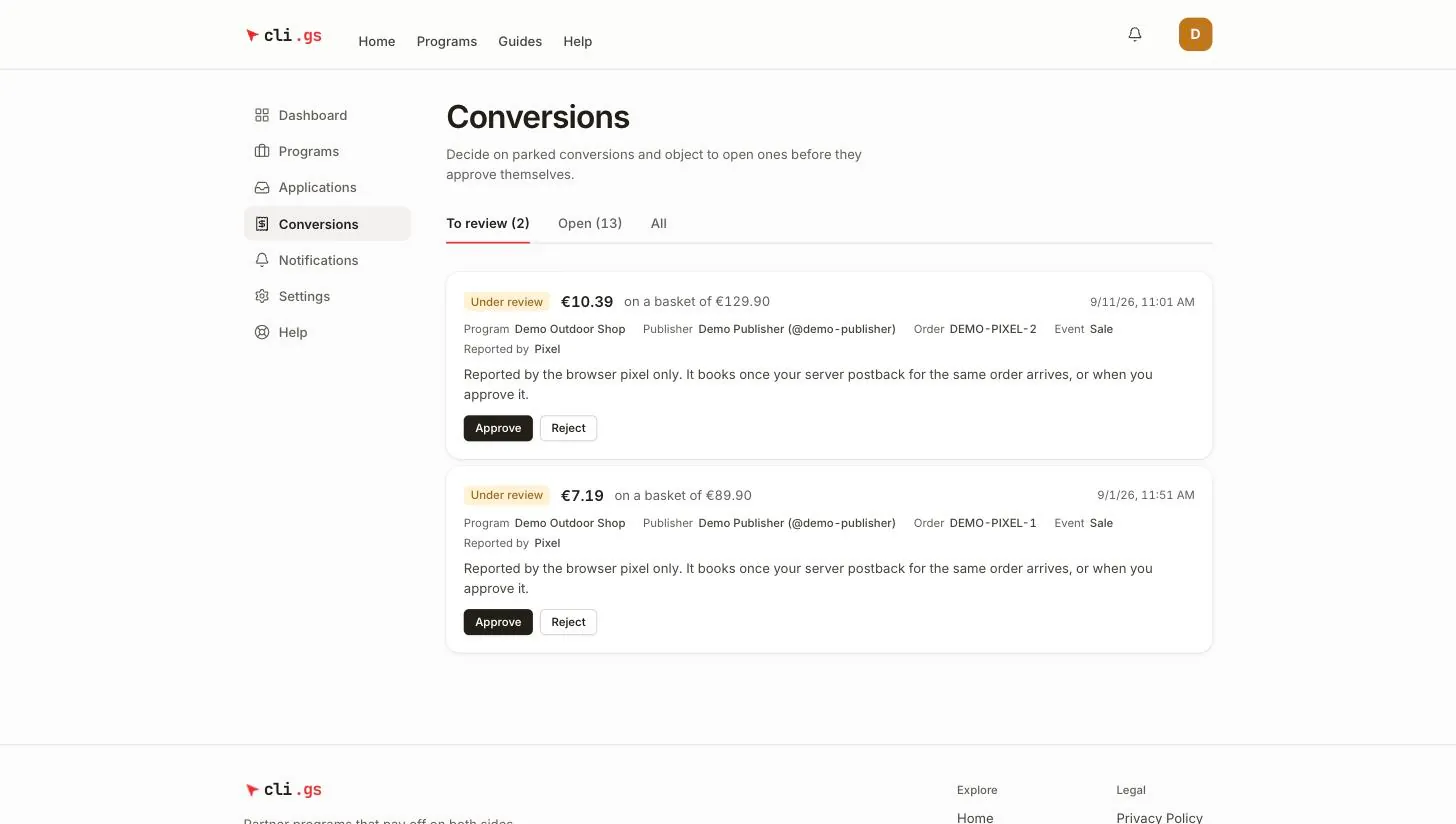
- To review — parked conversions that need a decision (with a count).
- Open — booked conversions still inside the approval window (with a count).
- All — everything, for reference.
Each entry shows the commission, the basket ("on a basket of …"), the date, the programme, the publisher, the order number and the event. Reported by says whether it came in via Server postback or Pixel. Test conversions aren't listed here; you find them in the integration diagnostics. See Testing and diagnostics.
Statuses
| Status | Meaning |
|---|---|
| Open | Booked: commission and fee are reserved from your credit. You can still object. |
| Under review | Parked: no money has moved yet. It waits for you (or cli.gs). |
| Approved | The approval window has passed or you approved it. The holding period is running. |
| Payable | The holding period is over; the publisher can be paid. |
| In payout | Locked for a publisher payout. Final. |
| Paid | Paid out to the publisher. Final. |
| Rejected | Refused by you or by cli.gs; any reserved money went back to your credit. |
| Reversed | Taken back by your shop through the API, e.g. after a return; money went back. |
The approval window
An open conversion approves itself 30 days after the sale unless you object. Each open conversion shows the date on which that happens. There's no button to approve an open conversion early: silence is the approval. This is deliberate. A merchant who never looks at conversions can't hold back a commission indefinitely.
After approval, the holding period you set in the programme terms starts. When it ends, the commission becomes payable. See Terms and commission rules.
Rejecting a conversion
Reject an open conversion when the order was cancelled or returned, is a duplicate, or breaks your terms:
- Click Reject.
- Choose a Reason: Order cancelled, Goods returned, Fraud, Duplicate, Terms violated or Other.
- Write an Explanation for the publisher, at least 5 characters, e.g. "Order cancelled on 12.10."
- Click Reject conversion.
Commission and network fee go back to your credit at once. The publisher sees the reason and your explanation and is notified. If you've set up a status postback, your shop receives one too. See Postbacks to your shop.
Parked conversions
Some conversions aren't booked straight away but parked in To review, with no money moved. Each one says why:
| Reason shown | What to do |
|---|---|
| Reported by the browser pixel only | It books automatically when your server postback for the same order arrives. Approve it only if you are sure the sale is real. |
| Your credit did not cover commission and fee | Top up. It books itself after your next top-up and continues as an open conversion. |
| Held for review because of the fraud signals | Check the signals shown and the order, then approve or reject. |
| No commission rule matched | Add a rule that fits (often for leads or sign-ups), then approve. |
| Not reported in EUR | Programmes settle in EUR only. Fix the currency in your shop's report; such a conversion cannot be approved. |
Approve books a parked conversion. The commission is calculated again with your rules as they are now, and commission and fee are reserved from your credit. If your credit doesn't cover it, the approval is refused. An approved parked conversion skips the approval window, since you've already reviewed it. Its holding period starts right away. Reject works as described above.
cli.gs admins see all parked conversions too and may decide fraud cases themselves.
Fraud signals
Signals don't refuse a conversion on their own. Together they decide whether a human looks at it. A conversion is parked once its signals add up to enough weight. The signals you may see:
- Pixel outside your domains — the pixel fired from a page not on your allowed domains.
- Publisher clicked own link — the publisher's own account made the click.
- Click and sale from the same IP — on the same day.
- Sale within 90 seconds of the click — faster than a real purchase usually is.
- Click from a bot — a crawler or headless browser.
- Click looked automated — the click was throttled or not counted.
Pixel-only conversions
The browser pixel is a fallback, and it never moves money on its own: anyone can load a pixel. Pixel conversions stay parked until the server postback for the same order confirms them. The postback's amount then replaces the pixel's. If you see many "Reported by the browser pixel only" entries, your server postback is probably missing. See Report conversions and Tracking pixel.